When developing applications in Power Apps, you may notice that as you add more features, loading times and processing times increase, which can negatively impact the user experience.
In this article, we will take a detailed look at a powerful technique to optimize Power Apps performance: the Concurrent function.
What is the Concurrent Function?
The Concurrent function is a tool that allows you to process multiple formulas in parallel, making it an easy way to speed up your app.
By executing multiple time-consuming formulas simultaneously, this function helps reduce the waiting time for users during processing. It’s one of the must-use functions to enhance your app’s performance effectively.
Basic Usage
The Concurrent function is very straightforward to use. Simply pass multiple operations as arguments to the function, like this:
Concurrent(
    ProcessA,
    ProcessB,
    ProcessC
)
If these operations (ProcessA or ProcessB) involve connecting to multiple data sources such as Dataverse or SharePoint, accessing them concurrently (in parallel) can significantly improve your app’s performance.
Points to Note When Using Concurrent
The Concurrent function is undoubtedly a powerful tool, but there are two important points to keep in mind.
1. Dependent on Devices and Browsers
The first point is that not all processes may run in parallel depending on the device or browser used to execute the app.
This limitation is typically due to the lack of processing power on the device or browser, and unfortunately, there’s no way around it.
2. Execution Order Is Not Guaranteed
The second point is that the execution order of processes within the Concurrent function is not guaranteed.
For example, in the following scenario where “Process B uses the result of Process A,” there is a possibility that Process B might execute before Process A, leading to unexpected errors:
// Risk: ProcessB might start before ProcessA finishes!
Concurrent(
    ProcessA,
    ProcessB,
    ProcessC
)
If you need to ensure the order of execution (e.g., “Process A → Process B”), you can chain the processes using a semicolon (;). This ensures that A and B execute in sequence, while C runs in parallel with them:
// Safe: A and B run sequentially, C runs in parallel
Concurrent(
    ProcessA; ProcessB,
    ProcessC
);
Experiment: Understanding Execution Order
First, we set up a simple wait function in Power Automate. This function waits for the specified seconds, then returns the string.
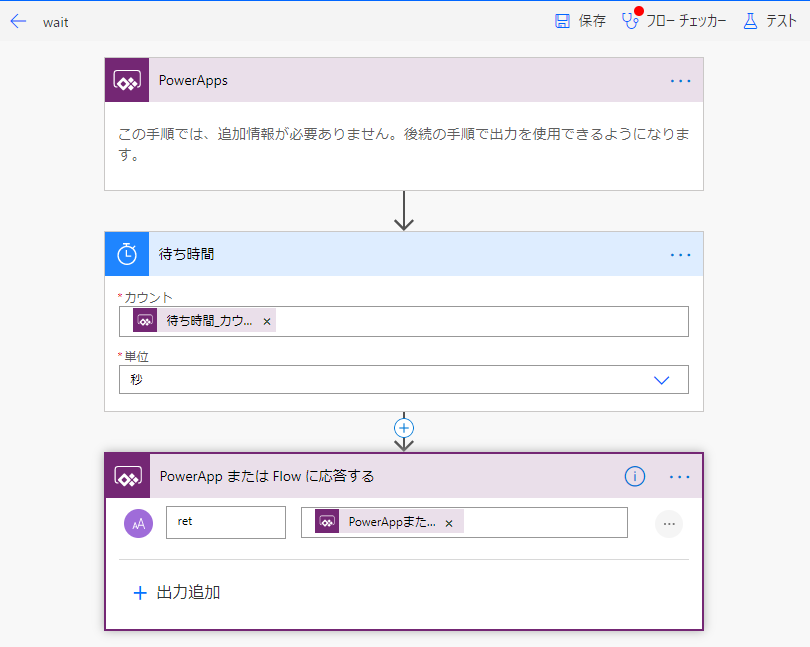
Next, we create the following UI in Power Apps:

We then add the following code to the button’s OnSelect property. This executes three processes that display the completion time of a 2-second wait in labels:
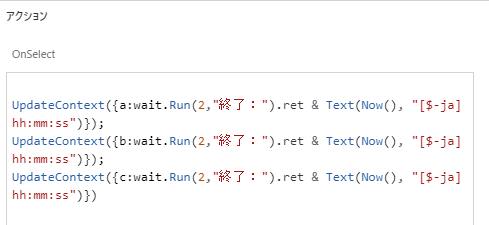
When executed, the result shows that each process runs sequentially:

Next, we wrap these processes with the Concurrent function:
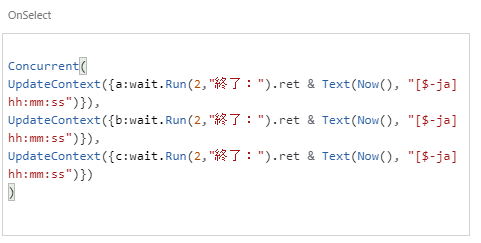
All three processes complete almost simultaneously:

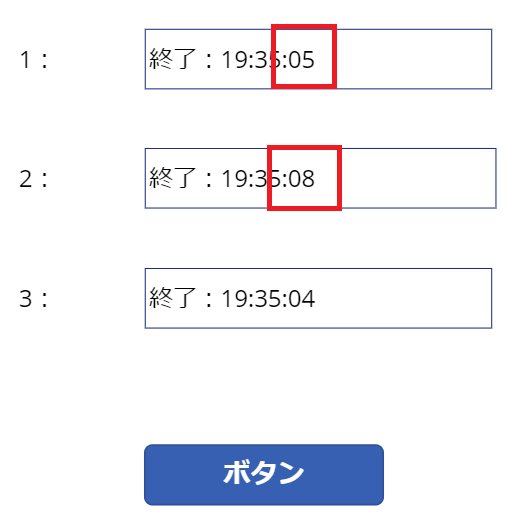
However, since the execution order is not guaranteed, the second and third processes might complete before the first one:

Finally, when we separate the top two processes with a semicolon:
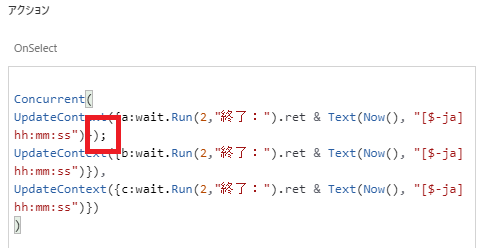
The execution order of at least the top two processes is guaranteed:
コメント